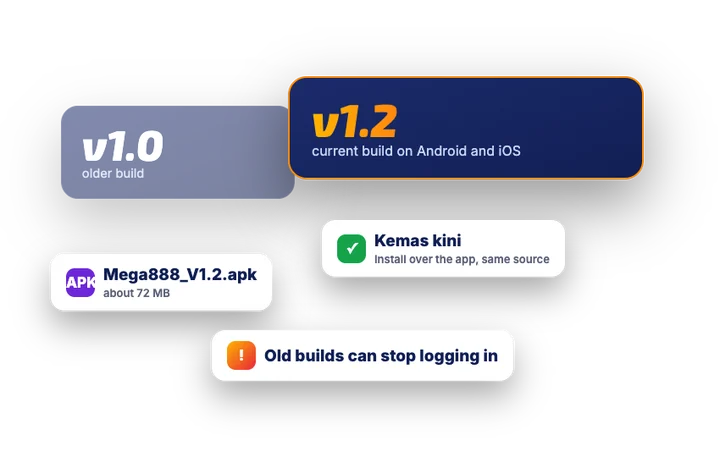
The current Mega888 build is 1.2
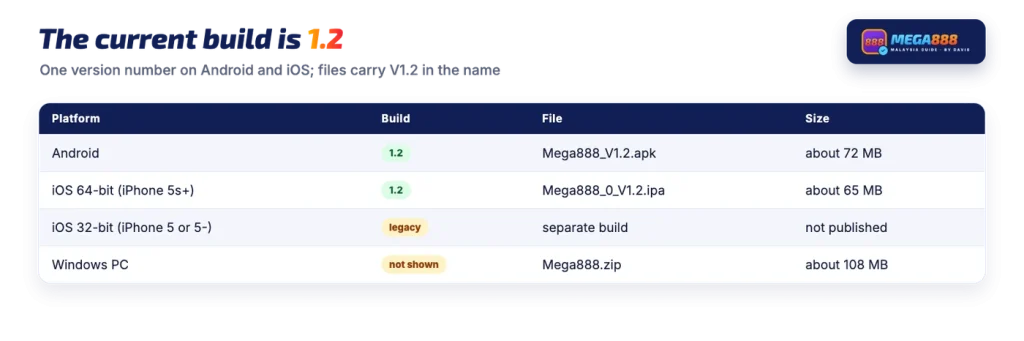
One version number covers both mobile platforms. The Android file is named Mega888_V1.2.apk and the 64-bit iOS build is Mega888_0_V1.2.ipa, installed through an iOS install manifest rather than the App Store. Very old iPhones have a separate 32-bit build with its own manifest. There is also a Windows package, which arrives as a ZIP that you unzip before running the program inside.
| Platform | Build | File | Size |
|---|---|---|---|
| Android | 1.2 | Mega888_V1.2.apk | about 72 MB |
| iOS 64-bit (iPhone 5s+) | 1.2 | Mega888_0_V1.2.ipa | about 65 MB |
| iOS 32-bit (iPhone 5 or 5-) | legacy build | separate install manifest | not shown |
| Windows PC Version | not shown in the file name | Mega888.zip | about 108 MB |
The Android file itself is dated 28 April. Searches for terbaru (latest) and for v1.2 point at the same thing, so there is no separate newer edition to hunt for: the four buttons listed with the current download files are the whole published set.
How to update the app (kemas kini)
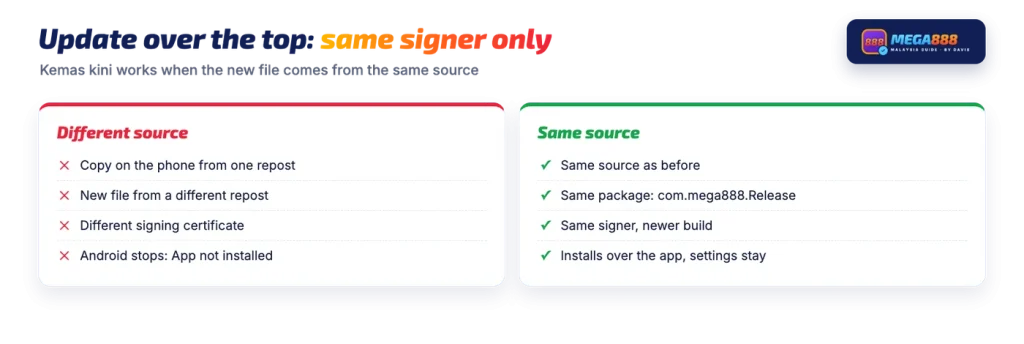
Updating is an install, not a patch. There is no in-app updater to tap, so you fetch the build again and install it over the copy on the phone. The step that matters most is the source, because Android compares the signing certificate of the new file with the one already installed.
A short Android path:
- Get the current build. Take the APK from the download page the platform publishes, or from the agent or casino that issued your account. Do not collect it from a different site this time.
- Install over the existing app. Open the file and confirm the install. The installer recognises the package already present and replaces it, so the icon and your settings stay where they were.
- Check the version afterwards. The app info screen should read 1.2 once the install finishes.
- Log in again if asked. Enter the same user ID and password issued to you, exactly as given, since both are case-sensitive.
On iPhone and iPad the idea is the same. Install the current build through the same route you used before, and if iOS shows the untrusted developer message on first launch, trust the developer again under Settings > General > VPN & Device Management. Older iOS releases keep that control under Profiles & Device Management.
Why an update can fail with App not installed
Android does not allow an installed app to be replaced by a file signed with a different certificate. The install simply stops with a short App not installed message. That is the normal outcome when the copy on the phone came from one repost and the new file from another, because each repackaged copy can be signed by whoever rebuilt it.
So a mismatch is a source problem, not a phone problem. If it happens, the two options are to install from the source that produced the copy already on the phone, or to remove that copy and install a file that carries the same signer as the original build. Removing an app clears its local data, but the account itself lives with whoever issued it, not in the app.
Looking for Mega888 versi lama or v1.0
Searches for versi lama (old version), v1.0 and v1.2 old version tend to come from two situations. Either a phone is too old for comfort and the reader hopes a lighter build will run, or a copy that once worked has been uninstalled and the reader wants the exact same file back.
Neither reason tends to end well. A platform like this is driven server-side, so in general an old client can be refused at login or fail to load games after the servers move on. This guide does not host or link any file, current or old, and reposted old builds are the riskiest things to install: they are rebuilt, re-signed and re-uploaded by strangers, and there is no way to tell from a download button which hands a file passed through.
Keep in mind
An old version is not a safer or luckier version; it is only older.
In general, a build number does not change how games pay. If an older file is the only thing that will install on a particular phone, treat that as a hardware limit to work around rather than as an advantage to chase.
Older phones and what the build needs
The Android build sets a minimum of Android 4.4 (minSdkVersion 19), and it targets Android 10 (API 29). As a general Android rule, recent versions of the system refuse to install apps that target very old API levels, which is one more reason an ancient repost may not install at all on a current phone.
On the Apple side, the split is about the processor rather than the iOS release. iPhone 5s and newer take the 64-bit build; an iPhone 5 or older needs the 32-bit one. The install mechanism works the same way across recent iOS releases, including iOS 15, 16, 17 and 18, because it is the enterprise install route rather than an App Store listing. If you are weighing up whether a separate app is the right choice for your phone at all, it helps to start from what the app is and how accounts work.
Checking which version is installed
On Android, open Settings > Apps, find the app in the list and open App info. The version shown there should read 1.2 for the current build. An APK-inspector app shows the version too, plus the package name com.mega888.Release and the signing certificate.
If the version shown is lower than 1.2, an update is the first thing to try when logins or games misbehave. If it already reads 1.2 and the app still refuses you, the cause is more likely the account or the server than the file, and account questions belong to whoever issued your ID.
FAQ
What is the latest Mega888 version?
Build 1.2. Both the Android and the iOS files carry V1.2 in their names. The Android APK is about 72 MB and the 64-bit iOS build is about 65 MB.
How do I update the app (kemas kini)?
Get the current build from the same place you installed it before, then install it over the app already on the phone. On Android the installer updates the existing app if the signing certificate matches. On iPhone, install through the same route and trust the developer again under Settings > General > VPN & Device Management if iOS asks.
Where can I get Mega888 v1.0?
Old builds are reposted on many sites, but this guide does not host or link any file, old or current. The published build is 1.2, and an older client can stop logging in once the servers expect a newer one. If you need a file, take it from the download page the platform publishes or from the agent or casino that issued your account.
Why does my old version not log in?
As a rule with server-driven platforms, an outdated client can be refused at login or fail to load games after a server-side update. Installing the current build from the same source often clears it. Wrong details also cause the same screen, since the ID and password are case-sensitive.
Will updating delete my balance?
In general, the balance belongs to the account rather than to the app file on your phone, and the account is held by whoever issued it. Installing a newer build over an older one does not move money. Log in with the same ID and password, and ask the issuer if anything looks wrong.